Your enquiries, sorted. In plain English.
If you can use WhatsApp, you can use this. Here's what TradeCRM does for your business — no jargon, no tech-speak.
It catches
Every enquiry lands in one place.
It replies
A friendly answer goes out fast.
It chases
Keeps nudging until they answer.
Catches every enquiry
Put a simple “get in touch” form on your website — whoever built your site can add it with a single line of code. Every enquiry goes straight into one list. No more hunting through texts, emails and voicemails to find who wanted what. You can also add someone yourself in a few taps.
In real life
Sarah fills in your website form at 9pm asking about a new boiler. It's sitting in your list, ready, when you get up.
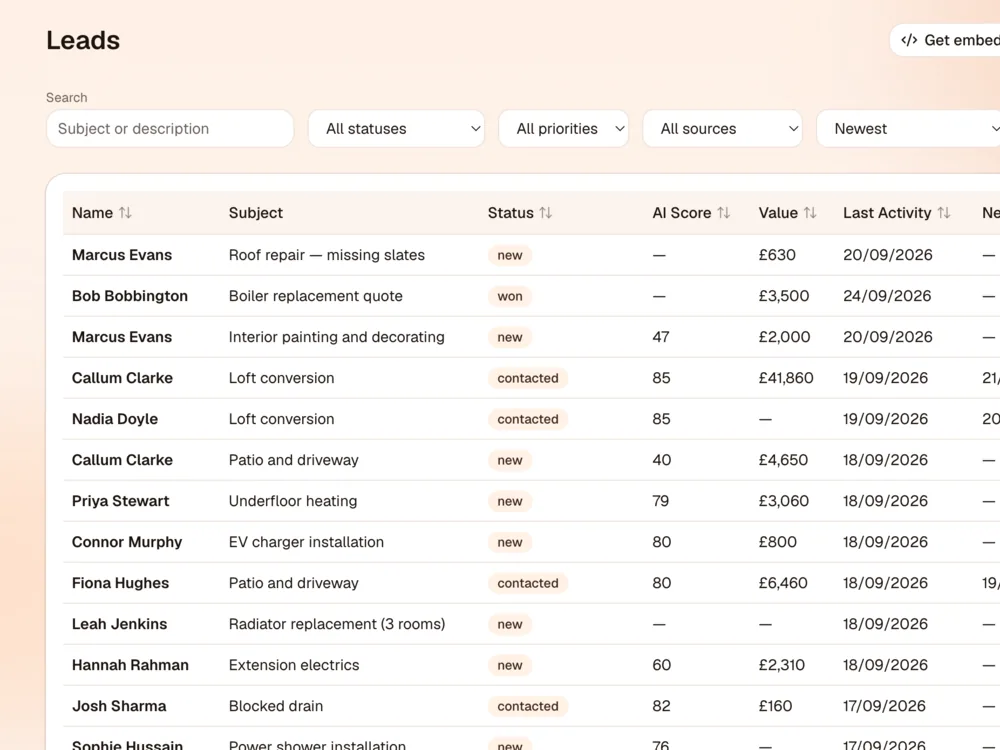
Shows you which jobs are worth your time
TradeCRM reads each enquiry and gives it a score and a short summary, so you can see at a glance which ones look most promising. It also spots what's missing — like photos, or the size of the room — so you know exactly what to ask for.
In real life
“Full rewire on a 3-bed house, wants to start next month” jumps to the top. You don't have to read every message to find the big jobs.
Writes the replies for you
Straight away, your customer gets a friendly “thanks, we've got your message” and a reply that asks the right questions. You choose how it sounds — chatty, formal, whatever suits you — and give it your own rules, like “always ask for photos before quoting”. Nothing goes out without you pressing Approve, unless you decide you'd rather it did.
In real life
A reply is waiting on your phone. You read it over a brew, tap Approve & Send, and go back to work.
Chases so you don't have to
Most jobs aren't lost to a competitor — they're lost because nobody followed up. TradeCRM sends a few polite nudges, spaced out over the days you choose. The second the customer replies (or you mark the job as won, lost or on hold) the chasing stops. No awkward “just checking in” after they've already booked you.
In real life
Dave hasn't answered in two days, so he gets a friendly nudge. He replies. The nudges stop and you get a notification.
Sends your quotes — and chases them too
Build a quote in a couple of minutes: what the job includes, the prices and VAT if you charge it, and how long it's valid for. TradeCRM emails your customer a link to a neat, professional page where they can read it and accept online — no printing, no PDFs flying about. You can see when it's been sent, whether they've opened it and whether they've said yes or no. If they go quiet, it sends polite reminders — by default after 3 and 7 days, but you choose when, or switch them off. They stop the moment the customer answers. Nothing is emailed until you press Send.
In real life
You send Bob a £3,500 boiler quote on Monday. On Tuesday you can see he's opened it twice. By Thursday he's gone quiet, so a friendly reminder goes out on its own. He accepts on Friday and you get a notification.
Real email, all in one place
This isn't just a form. When a customer replies to one of your emails, their answer lands back in the same conversation on that job. You can see the whole chat — what you said, what they said and when — without digging through your inbox. Need to jot something down that the customer shouldn't see? Add a private note to the same conversation. It's only for you and your team, and it's never emailed.
In real life
Six weeks later a customer asks “what did we agree on the price?” The whole conversation is right there — along with your note that says “happy to drop £100 if they book before Friday.”
Keeps track of your customers
Names, numbers, emails and company in one tidy list you can search. Add notes for the things you'd never remember — the gate code, the dog, the neighbour who complains about noise. Got a spreadsheet of customers already? Upload it and they're all in. If someone asks you to stop emailing them, TradeCRM remembers and leaves them alone.
In real life
Note on a customer: “Key under the blue pot. Dog is friendly, honestly.”
Shows you what needs doing today
Open the app and the first page tells you how many new enquiries you've got, which ones have gone quiet and need a nudge, how many follow-ups are due today, and roughly how much work is in the pipeline. You can put a value on each job, so you can see what's at stake.
In real life
Monday morning: 3 new enquiries, 2 quiet ones to chase, and £8,400 of possible work on the go.
Ask it, like you'd ask a person
There's a built-in assistant you can just talk to. Ask it to look up a customer, add a new enquiry, change a phone number or draft a reply. No menus to hunt through — type what you want done in ordinary words. It can even put a quote together: it asks for the bits it needs, like what's included, the prices and whether to add VAT, then saves it ready for you to check.
In real life
“Can you change Joe bloggs' phone number to 07770 989765?” Done. Or “Quote Bob for a new boiler” — it asks for the price and whether you charge VAT, and the draft is waiting for you.
A to-do list for the jobs behind the jobs
Order the materials. Ring the council. Send that invoice. Jot it down, tick it off when it's done, and drag things around to put the most important at the top. Finished jobs drop to the bottom so they're out of your way.
In real life
“Pick up 22mm copper pipe” — ticked off before you leave the merchants.
Works on your phone, tablet and computer
You're rarely at a desk, so TradeCRM is built to be used from the van or on site. Add it to your phone's home screen and it opens just like any other app. It's the same list on every device, so nothing gets out of step.
In real life
Check an enquiry from the driveway, reply from your phone, finish the paperwork on the tablet at home.

Tells you when something matters
You don't have to keep checking. Get a notification when a good new enquiry arrives, a customer writes back, or someone opens or answers your quote, and choose which ones you want to hear about. You can also switch on a short morning summary: how many new enquiries came in overnight and how many are waiting on you.
In real life
A customer replies while you're on a roof. You see the notification at lunch, not three days later. And every morning at 8, you know exactly where you stand before you've left the house.
Questions you might have
Straight answers
Do I need to be good with computers?
No. If you can send a text message and read an email, you can use TradeCRM. There's no training course and only a handful of simple pages to find your way around.
Will it send messages to my customers without me knowing?
Not unless you switch that on. Out of the box, every reply and follow-up waits for you to read it and press Approve. If you'd rather it just got on with it, there's one switch in the settings.
Can I send quotes with it?
Yes. Build a quote from any enquiry and TradeCRM emails your customer a link to it. They can read it and accept or decline online without signing up for anything, and you can see when they've opened it. If they don't answer, it sends reminders for you — by default after 3 and 7 days, and you can pick your own days or turn them off for any quote. A quote only goes out when you press Send.
What happens when a customer replies?
The chasing stops straight away, their reply appears in the conversation on that job, and you get a notification so you can take it from there.
Which trades is it for?
Any. Plumbers, electricians, builders, roofers, heating engineers, decorators, landscapers — anyone who gets enquiries and loses work when they can't reply fast enough.
Does it work on my phone?
Yes. It's built to work on a phone or tablet as well as a computer, and you can add it to your home screen so it opens like an app.
Can my partner or someone in the office use it too?
Yes. Everyone gets their own login, so you can see who did what. The £19 plan includes 2 logins (handy if your partner does the paperwork), and bigger plans include 5 or 10. You invite people by email and they set their own password.
How much does it cost?
Plans start from £19 a month, and there's a 14-day free trial so you can see if it's right for you before you pay anything.
Give it a go — free for 14 days
Set it up in a few minutes and see how many enquiries you've been missing.